


Boost Visual Voicemail
4.713.64K Reviews
App Specs
- Version
- T.11.3.0.2
- Updated On
- License
- Free
- Downloads
- 10,000,000+
- Developer
- DISH Wireless L.L.C.
- Categories
- Communication
- Platform
- Android
Screenshots



 Analysis by AppCompare
Voicemail is easy to ignore until an important message is buried behind a sequence of calls, prompts, and audio playback. Boost Visual Voicemail takes a more direct approach: it puts voicemail access on the phone instead of making me rely on the traditional dial-in experience. After using it as a communication utility, I found its appeal less about adding flashy extras and more about making an ordinary phone task easier to manage.
Boost Visual Voicemail is a free communication app from DISH Wireless L.L.C. It is available for everyone and supports Android devices running version 8.0 or later. The current version is T.11.3.0.2, and the app has reached over ten million installs. Those details matter because this is a focused tool rather than a broad messaging platform: its usefulness depends mainly on how often you receive voicemail and whether you prefer handling messages from a visual screen.
What the app changes about checking voicemail
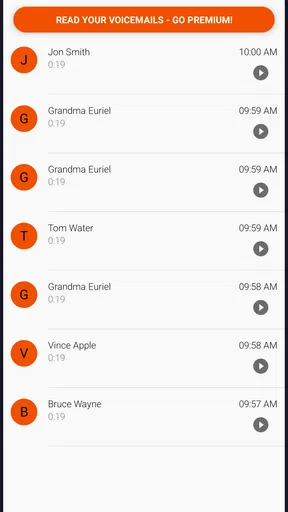
The main improvement is simple to understand. Instead of calling a voicemail system and listening through messages in sequence, I can open the app and deal with voicemail from the device interface. That shift makes the experience feel more like checking an inbox than navigating a phone menu.
That distinction is especially useful when I need to decide quickly whether a message deserves attention. A visual list gives me a starting point for sorting through incoming messages, while the conventional method tends to force a more linear routine. For someone who receives several calls during a workday, that small change can reduce the friction of checking messages between tasks.
I also like the separation between the phone’s general call history and voicemail handling. Missed calls tell me who tried to reach me, but they do not always make it obvious which callers left a message. A dedicated voicemail screen keeps that information together, which is helpful when I am returning calls after being away from my phone.
The app is not trying to replace text messaging, email, or a full calling service. It serves one narrow purpose. That focus is a strength when I want a straightforward voicemail tool, although it also means the app will feel unnecessary to people who rarely receive voice messages or already have a voicemail workflow they like.
How it fits into an ordinary day
Consider a practical situation: I am in a meeting when two calls arrive from an unfamiliar number. I cannot answer, but later I see that one caller left a voicemail. With a visual voicemail app, I can open the message, identify what it concerns, and decide whether to call back immediately or leave it for later. I do not have to treat every missed call as equally urgent.
Worth Reading Before You Choose

EA SPORTS FC Mobile 26 Is a Bigger Football Game, but It Takes Time

Flipboard Shows What News Apps Must Do Beyond the Feed

Switching to Android Auto Means Rethinking Your Driving Routine

Google Calendar Makes a Crowded Week Easier to Manage

Ludo King Makes the Most of the Minutes Between Plans

Baby Panda World Brings Quick Play to Modern Phones, but Its Game Library Feels Busy
A similar benefit appears when I am traveling between appointments. Rather than listening to messages in a fixed order, I can use the app as a quick checkpoint before deciding which calls require a response. That is not a dramatic feature, but it changes voicemail from a chore into something I can review on my own schedule.
One useful habit is to check the voicemail screen before returning unknown calls. The message may provide enough context to distinguish a genuine personal call from an unimportant interruption. This does not eliminate unwanted calls, but it can help me avoid calling back blindly.
Free access and the question of value
The app is free, so the value question is mostly about convenience rather than whether it justifies a purchase. I do not have to weigh a subscription against the number of messages I receive. If visual access makes voicemail easier for me, the benefit comes without an app charge.
That does not mean every user receives the same practical value. Free access is most meaningful for someone whose phone service and device work properly with this voicemail experience. A person who never listens to voicemail gains very little, even if the app costs nothing. In contrast, anyone who regularly misses calls, manages messages for work, or dislikes dial-in menus can get useful everyday value from a focused tool like this.
The free model also makes it easier to try without much commitment. I can see whether the visual approach fits my routine instead of paying first and discovering that I prefer the traditional voicemail method. For a communication utility with a narrow job, that low-risk trial is one of its strongest advantages.
I would still avoid treating “free” as a reason to install every utility automatically. The real test is whether the app saves me time or reduces confusion. If opening it becomes another step I forget to take, its price does not compensate for the lack of practical use.
Where the experience feels more useful than standard voicemail
The clearest advantage over ordinary carrier voicemail is orientation. A phone menu usually asks me to listen, skip, delete, or repeat while keeping track of where I am in the sequence. A visual interface gives me a clearer overview before I start processing messages.
That overview is valuable when I am dealing with a busy call day. I can approach messages intentionally rather than listening to everything just to find one particular call. It also makes voicemail feel less disruptive because I can choose a suitable moment to review it.
Another practical strength is reduced dependence on memory. With a traditional system, I may remember only that a message was “somewhere in the list.” A visual layout gives me a more obvious reference point when I return to voicemail later. This is useful for people who receive messages from clients, family members, delivery services, or schools and need to follow up at different times.
There is also a psychological benefit. I find a visual list less intimidating than an audio-only queue. When several messages accumulate, the screen gives me a sense of what needs attention instead of presenting an undifferentiated block of listening time.
Tradeoffs that should shape your decision
The app’s narrow focus is also its main limitation. It is not a general communication hub, and I would not choose it expecting text conversations, email organization, or advanced call management. Its job is voicemail access. If I need a broader communication solution, another app or the phone’s built-in tools may be a better fit.
There is also a difference between visual access and intelligent message handling. Seeing voicemail more clearly does not automatically mean that messages are summarized, transcribed, filtered, or prioritized. I would not assume that a visual presentation replaces listening when the exact wording or tone matters.
That point is important for work calls. A short message may sound clear enough when played back, but a detailed request can still require careful listening and perhaps a written note. The app can make the message easier to reach; it does not remove the responsibility of understanding it accurately.
Another tradeoff is that the experience depends on the surrounding phone setup. A voicemail application is most useful when it works naturally with the device and service arrangement. If I am using a phone configuration that does not integrate smoothly, the convenience can be reduced. Before making it central to my routine, I would place a test call, leave a message, open the app, and confirm that the complete process behaves as expected.
That test is also a good way to answer a common practical question: will the app help me with every voicemail situation? I would not assume that. The safest approach is to verify how new messages appear, how playback works, and how I return to an older message before relying on it for time-sensitive communication.
Small workflow habits that improve its usefulness
My first recommendation is to treat the app as a review queue rather than an emergency alert system. If a call is genuinely urgent, the caller may try again or use another channel, but voicemail alone should not be treated as a guaranteed real-time notification. Checking the app at sensible points in the day creates a predictable routine without making every notification feel urgent.
Second, I would review messages before deleting or dismissing them whenever the caller is unfamiliar. A message that sounds unimportant at first may include a reference number, appointment detail, or callback request that I will need later. Visual access makes it easier to pause and choose deliberately instead of clearing messages as soon as they appear.
Third, I would use a simple follow-up system outside the voicemail screen for anything that requires action. For example, after hearing a message from a service provider, I might add a reminder to my calendar or notes. The voicemail app helps me reach the information, but it should not be expected to replace a task manager.
A fourth insight is that the app is particularly useful for separating “missed call anxiety” from actual communication needs. Not every missed call deserves an immediate callback. Listening to the message first lets me make a calmer decision, which is a small but meaningful improvement for people who receive frequent unknown-number calls.
Who is likely to get the most value
I would recommend it first to people who depend on phone calls but do not want voicemail to interrupt their day. That includes anyone who works away from a desk, receives calls from customers or colleagues, or regularly needs to return messages in a particular order.
It can also suit family users who miss calls while driving, studying, caring for children, or handling appointments. The visual approach makes it easier to catch up later without replaying every message just to find out who called.
Users on older supported Android devices may also appreciate that the minimum operating system is Android 8.0 rather than requiring a recent phone. That gives the app a practical place on compatible devices that are not brand new. I would still check the device experience personally, because age alone does not guarantee that every phone handles an app in exactly the same way.
The app has a 4.7 average from around ninety-seven thousand ratings, with roughly fourteen thousand written reviews. I see that as a strong sign that many people find the basic experience useful, although popularity does not remove the need to check whether it suits my own calling habits.
Who should choose something else
I would skip it if I almost never receive voicemail. Installing a dedicated tool for a task I do once every few months adds clutter without solving a real problem. The same goes for anyone who is already happy with the phone’s existing voicemail controls and does not feel slowed down by them.
I would also look elsewhere if I need advanced communication features rather than visual voicemail access. People seeking transcription, shared inboxes, business call routing, or extensive filtering should compare specialized services instead of expecting this focused app to cover those needs.
It may not be the right choice for someone who wants one place for every conversation. Texts, emails, social messages, and calls remain separate parts of daily communication. This app improves one part of that picture, but it does not unify the whole system.
Finally, I would be cautious about depending on it without testing the message flow first. A voicemail tool is only valuable when it reliably fits the phone routine. A short trial with a non-critical message is more useful than assuming that a familiar app category will automatically behave exactly as I expect.
My verdict on the free download
Boost Visual Voicemail earns its place as a practical communication app because it addresses a specific annoyance without charging for access. I like it most when I have several missed calls to review and want to decide what matters before returning anyone’s call. The visual approach is clearer and less rigid than the usual dial-in method, especially for people who manage voicemail throughout a busy day.
Its limitations are equally clear. It is not a complete communications suite, and visual access should not be confused with transcription, automatic prioritization, or a replacement for personal follow-up. The app delivers the most value when my problem is simply that traditional voicemail is inconvenient.
My recommendation is straightforward: if voicemail is part of your regular routine and you use a compatible Android phone, this free app is worth trying. Test it with a harmless message, build it into a checking habit, and use a separate reminder for anything that needs action. If you rarely receive voicemail or want advanced call-management tools, skipping it is sensible. For the right user, its value comes from removing friction from an everyday task, not from pretending to be more than a focused voicemail companion.
Pros
- Transcribes voicemails into readable text for quick scanning.
- Shows caller details and message previews in one inbox.
- Supports playback controls for easier message navigation.
- Can reduce time spent listening to long or unwanted messages.
- Offers a cleaner alternative to standard carrier voicemail menus.
Cons
- Availability depends on carrier support and regional compatibility.
- Transcription accuracy may drop with accents
- noise
- or unclear speech.
- Some features may require a compatible Boost Mobile plan.
- The app may need notification and phone permissions to work fully.
- Voicemail syncing can be delayed when network coverage is weak.
FAQs for Boost Visual Voicemail
What is Boost Visual Voicemail and how does it work?
Boost Visual Voicemail is a voicemail management service for compatible Boost Mobile devices. Instead of calling a voicemail number and listening to messages in sequence, the app can display available voicemails in a visual inbox. Depending on your device and plan, you may be able to see caller details, review message length, play messages in a preferred order, and manage or delete recordings more conveniently.
Is Boost Visual Voicemail free to download and use?
The application or voicemail feature may be available at no additional charge on eligible Boost Mobile plans, but availability can vary by device, account, region, and network configuration. Standard mobile data charges may apply when messages are downloaded or streamed over cellular data. Before installing or activating it, check your Boost plan details and the app listing to confirm whether any service, data, or premium charges apply.
Does Boost Visual Voicemail work on every Android or iPhone?
No. Compatibility depends on your Boost Mobile account, phone model, operating system, carrier configuration, and the voicemail service enabled on your line. Some phones support visual voicemail directly through the built-in Phone app, while others may require a separate Boost application. If the feature does not appear after installation, confirm that your device is supported, your software is updated, and voicemail has been activated correctly.
Can I use Boost Visual Voicemail without an internet connection?
An internet connection is generally needed to synchronize the voicemail inbox and retrieve message information, especially when using mobile data or Wi-Fi for the first time. Previously downloaded messages may remain playable offline, depending on the device and app behavior, but new voicemails may not appear until the service reconnects. Cellular data usage can apply, so Wi-Fi is useful when available.
What should I do if Boost Visual Voicemail is not receiving or playing messages?
Start by checking that your phone has a working mobile connection or Wi-Fi, voicemail is properly set up, and the app has the permissions it needs. Restarting the phone, updating the app and operating system, and clearing temporary app data may resolve synchronization problems. If messages still do not appear, contact Boost Mobile support because the issue may involve account activation, network provisioning, or device compatibility.


